Some interesting lip sync examples


If you can look past how irritating Penny is, the Rescuers has some interesting little scenes that are heavily dialogue-based. Normally there's something of a rule of 'show, don't tell,' but the animators were careful enough to keep enough happening in the scene so it wasn't just two characters talking at each other. There's some great personality expression here — the emotions and movements are exaggerated without being too over the top or unbelievable. If you watch closely the lip sync really isn't completely accurate — often the character's mouths just kind of open and close in time with the words. This is especially apparent in the Jungle Book scene where Shere Khan uses a lot of 'Oo' words but his lips don't really purse at all.  It still reads very well, though — I guess the sight of Auntie Medusa peeling off her eyelashes is so gruesome that you don't really notice anything else!

The eyes show a great deal. They completely change shape to accommodate the lack of proper eyebrows but remain consistent in volume; so far I've found it difficult to get such flexibility and character in the face without distending it ridiculously. There's nothing wrong with that if done correctly, but so far my attempts have just come out looking stiff and lifeless. I think the problem is that I'm isolating them as their own shape, rather than considering their volume and how they affect the rest of the face.

Lip sync version 1 (unpolished)

First attempt at a lip sync! I apologise for the most uncreative selection of dialogue...


I basically just drafted out the vague mouth shapes on paper and whacked it all together in Flash just to see if my timing was right. There's absolutely no expression or emotion just yet and the mouth is all over the shop in terms of volume and consistency. I plan on doing something more exciting later, but I really just wanted to make sure it synced up correctly.

It doesn't really look quite right to me but I'm not entirely sure why. I'm worried I might be using too many shapes for each sound?

Seventh walk cycle attempt

Another walk cycle attempt, using a totally fresh character. I still can't get the hang of making the arms seem more flexible so I decided to try and incorporate their stiffness into a sort of march.

I was really excited all the time I was working on this and had real fun with it — it was nice to use what felt like a much looser character. Unfortunately it didn't come out quite as well as I'd hoped.


I don't think there's really enough bounce in the walk. The character's quite cartoony and looks as if he should have a lot of up-and-down movement to match the exaggerated swing of his arms. This one has a lot less frames, too — only 16 in total, counting inbetweens. This meant that it was easier to work on and plan out but the fluidity suffers for it.

Overall I don't think it's too bad, but it could really use some cleaning up and alterations to the up and down positions to make them more prominent.

Sixth walk cycle attempt


Slightly better than previous attempts — at least the arms move properly this time, but they still feel very stiff and very slow. I'm not entirely sure what I'm doing wrong here; I think it may be that, rather than just drawing the inbetweens with the frames pegged as normal, I try to line up the heads so they're at the same height. I thought that lining up the shoulders that way meant it would be easier to figure out the position of the arms, but it usually ends up comes out looking a bit squiffy. I guess it's because it doesn't take into account the shifting of the body and difference in height in each frame?

I think I'll try a totally different cycle next time as I can only learn so much by constantly tweaking the same one over and over.

Digital Animaton: Alice & Martin Provensen (textural/colour influence)

I've been looking a little more into Alice & Martin Provensen's work, discovering (to my delight) that that they did more than just bright, primary-coloured cutout work. I found a small selection of grittier images that use a much more toned-down palette which I think is much more in keeping with the fairytale theme I've been pursuing so far.
The cutouts as seen here are still very stylised and simplistic. The boy in the bed on the left, in particular, strikes me as very 'puppet-y'. It's very easy to imagine what he would look like in motion as an animated character.
The background elements are very softly coloured and almost always feature an outline. This is pretty interesting and something I hadn't initially noticed — not giving the characters an outline prevents them from merging into the background and becoming indecipherable. This is pretty well demonstrated in the image below:
The Provensens also did a lot of looser, sketchier work using very rough inks. Much like Arthur Rackham they seemed to use quite limited colour palettes, although I imagine this was a stylistic choice as opposed to technical necessity:
I love the gestural feeling of the drawings and all the textures. From the images above it looks like they may have used some sort of acrylic paint and watercolours with quite thick brushes. It seems as if they might have dabbed or stabbed as opposed to strokes with the brush. It almost has the feeling of a sponge painting.

I think it might be possible to replicate similar effects by almost carelessly overlapping paints. Clearly they weren't worried about staying inside the lines! I may experiment with loosely blocking out the general shapes with a colour wash (or even tea) in order to try and capture the instantaneous, gestural feel of the drawings.

Fifth walk cycle attempt

I went back again and rejiggled my last attempt, having a crack at fixing the arms. This time I made sure that the arms were further away from the body at the highest point of their swing to allow more space for inbetweens.


I quite like the up and down movement, but the arms are too stiff. The upper arm movement looks okay but the lower arms need to follow their own arc and 'flick' a bit as they swing back and forth — at the moment they follow the movement of the upper arm and so appear a bit stiff.

There's another kink in his arms that Ron suggested might be due to the first and last frames (where the cycle begins again) not quite lining up properly, so I'll go back and have a look at those to see if there's anything I can do to fix it. He also suggested a couple of oddities in the figure's front knee, the first where the foot slides back as the figure drops but the knee doesn't quite follow. There's also a point just before the passing position where the leg kicks backwards instead of coming forwards — I was getting pretty frustrated because I couldn't really see where I was going wrong so I'm really glad he was able to point these things out to me. Being able to actually do something about it is immensely satisfying!

Digital Skills: Backdrop experimentation

Been doing a bit of tinkering with Photoshop, taking some inspiration from the works of Lewitt-Him and Alice/Martin Provensen. I wanted to see whether I could produce a similar effect to their simplistic cutout style using digital techniques.

Click for larger view
Not altogether too happy with it. I'm fairly pleased with the trees and grass and general scenery, but I really lost my groove on the house, which came out horrendously. There was a lot of detail that was difficult to break down and I was starting to get really impatient with some technical issues (read: Photoshop throwing up an "unrecoverable error" at me every 10 minutes), so I ended up really rushing it!

I thought that having quite bold and simplistic backdrops could work quite well if I was to have quite detailed character puppets, helping to bring focus to the scene. I think the colours could stand to be a little more subdued. Though I used a relatively limited pallette it's almost quite garish and potentially distracting. Lowering the opacity might help as opposed to completely re-colouring the entire scene.


The image was quite simple (if a little time consuming) to create — the original image (above) was sourced from sxc.hu, a free stock image resource. Ordinarily, I would prefer to go out and source my own images to use, but for the purposes of a spontaneous experiment it didn't really seem worth a trip to Holland ;] Retrospectively I could have used almost any image but I thought I'd try and keep with the theme of the project!

First I applied a Poster Edges filter to the image. This was to darken existing contrast boundaries and help Photoshop detect the edges of each object in the image when it came to the selection process.
 I then increased the brightness and contrast very slightly — again, to help with edge detection.
The cutout filter is one usually best avoided — in this instance, though, I found its use acceptable in order to help simplify the colours and shapes in the image, providing me a solid guideline to work from.
I then duplicated the background layer and applied a Find Edges filter to the copy. This gave a strong, distinct outline to everything in the image.
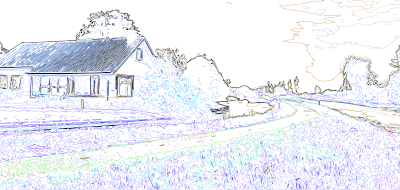


Unfortunately, in doing so, it also loses its colour information. Ideally I need the guidelines and the simplified colours/shapes from the previous layer, so I applied a Soft Light blend mode to remove the white from this layer and overlay it onto the one below.


The result is this fairly ugly but very useful image. It contains both the outlines from find edges and the simplified colours and shapes from the cutout filter, providing a perfect guide to paint over.


Because of the clear colour and edge distinction, I was able to simply use the magnetic lasso tool to make a loose selection around any area in the image. Photoshop was able to very accurately detect the edges of whatever I was selecting and mostly guided itself.
I could then just fill the selection with my chosen colour.