Showing posts with label Photoshop. Show all posts

Sad character walk V3, take 2

My head feels like it's stuffed with cotton wool and my bed is calling my name, so forgive me if this is a little garbled!


Started adding inbetweens and whatnot — I don't know if it's just because I'm so tired but it's really starting to give me a headache. I just can't get it to look right.

There are still problems with the crossover — I keep messing things up when I re-draw the frames for the opposite leg — I think because the rear leg is slightly smaller so I need to be careful and make necessary adjustments to make it fit with the angles of the front leg.

I think I need to perhaps tilt the foot upwards a little more (and perhaps delay it for a bit) before he brings it back down to help give it more power. It's a little too soft at the moment. He's quite a heavy character so the down step needs to carry more weight.

Also, when he comes down, the volume of the trailing leg/foot radically changes, creating a bit of a 'snap'. Need to look at adjusting that and perhaps add some more inbetweens to pad it out a bit

I'm really disappointed in myself — I wanted to get the legs completed to a satisfactory standard tonight so I could focus on the arms or something tomorrow. Oh well — there's no sense in working whilst in a flu-induced stupor, it'll just create more problems later on. Let's see what the morning brings!

Sad character walk V3

Here we go again!!


Rather than struggling on editing my old walk cycle, I decided to just start fresh using my old frames as reference. Sometimes it's quicker just to start with a blank canvas — tweaking my old animation was just needlessly complicated and frustrating, because you kind of end up locked into your old mistakes and limited by what's already there... if that makes sense?!

Andy gave me some great advice on the position of the legs. Previously it appeared as if the toes dragged through the ground. Here I've tried to rectify the problem by marking where the hips would be, allowing me to easily give them a little torsion (is that the right word to use?) and lift the leg a little further off the ground, mostly solving the problem.

The mood isn't quite there yet — obviously without inbetweens the timing is off, making it look a bit angry!

I attempted to act out the walk a few times and I noticed that, rather than in a "conventional" cycle where the heel brushes the ground and the foot smoothly strikes the floor, I tended to bring my foot straight down very suddenly. When dragging my feet, my toes were very slow to come off the floor and they were dragged almost reluctantly upwards. I'm going to experiment with this timing by delaying the lift of the toes until the last possible moment when they're dragged upwards before coming straight back down much faster.

It's interesting to note how, without any inbetweens, this walk is very similar to how an "angry" cycle might look. In an angry cycle the character might bring his feet up very fast and slap them straight back down with very little pause — similar to here. This could save me a lot of time later on if, for my angry cycle, I can refer back to this cycle and simply make minor adjustments to timing.

Sad character walk V2

 
I began to attempt cleaning up the lines of my previous attempts and trying to nail the rest of the inbetweens. I'm really, really not at all happy with it. The leg volumes are a little more consistent and I think the timing is very nearly there but it just wasn't working for me at all. 
There are masses of problems with the feet — they don't really flop and drag as I'd like them to. They also delay in the centre of the body at the crossover which looks pretty weird.

Later on, when I attempted to add the body, I found it extremely difficult because I'd drawn the legs first with no consideration of the character's torso. I ended up with all sorts of problems like knees ending up where the chest should be.
 

You can see I struggled — I really couldn't figure out how to fit the body around the legs. That shouldn't have happened; I shouldn't be needing to try and fit things around other things. Everything really just needs to work together. I think it's okay to focus on the movement of one body part at a time but I really need to consider how the character's body will move in relation to the legs.

In general I think I tried to be too refined and controlled with my lines. I need to relax and be a bit looser in these early stages — I think that's why my first attempt had so much more character to it. Despite being flawed and rough, it had a little more personality to it.

Still, as they say, third time's the charm...

Walk cycle 10, take 3


Cleaned and more refined version of the previous walk cycle. I made a number of small changes to the arms, hands and feet. Most notably is the swing of the arms; I removed the 'break' in the joint as it swings forward. Breaking the joint helps to add a bit of flexibility but I didn't feel that it really fitted with the gentler sort of effect I was going for. I also fixed the problem with the arm lagging as it comes forward — only a minor change but I feel that it's a lot smoother now.

I'm quite pleased with the flick of the hand as his arm is at full extension! I'm less happy with the arm as it swings forward — I think there's a bit of a kink in it somewhere — but otherwise I'm reasonably satisfied with how it's turned out. I'm certainly starting to understand the mechanics of the arms a lot more now.

Walk cycle 10, take 2


Feels like I've been tweaking this forever! I re-did the arms and head at least four billion times each because I simply could not get them to look right. The arms are far too long, I think, and they seem to change length in a couple of places. I'm really not that happy with the head but this was the best out of all five of my attempts. I think it's alright, it just looks a bit 'floaty' and doesn't seem to match up with the body. I can't quite put my finger on it.

I'm reasonably happy with the arms, I think they're an improvement over the last several attempts in terms of looseness, but there's still room for a lot of improvement. The way they swing back bothers me — I don't think they come back far enough and it seems as if they linger in the same spot for just one frame before coming forward which looks a bit strange. The elbow is too low on the forward swing as well.

I kept the hands pretty simple. I quite like the flick as they come forwards, but again, really not too pleased with the backwards swing. 

Overall I think it's passable as a finished attempt but I may see if I can go back and make some minor tweaks to clean it up a bit.

Walk cycle 10

I wasn't happy with how the arms on my previous attempt were looking, so I removed them entirely and re-did them from scratch. I added a few more inbetweens on the legs and I think I'm fairly happy with the way they move now. I'm not sure about the feet — they still feel a bit stiff and lifeless to me so I'll have to see what I can do about that.


I think I'm mostly there with the movement of the arms at this point, they're certainly loosening up nicely and I'm fairly pleased with them, but I feel the flick at the end is a bit too much. I want something a little bit more subtle so I'll have to see what I can do with that. I'm not happy with the rear arm for a multitude of reasons (all of which are hard to articulate) but I'll be tweaking that some more before I really start refining my lines. Once I've tweaked the arms, I'll be looking at adding the head and hands.

Walk cycle 9, take 3 & 4


I tried to solve the jolting problem by lining up the feet more accurately using the grid at the bottom, but ended up making it worse. The upper body is totally out of sync and I really cannot figure out what's wrong with it.

I'd hoped that, if I went in and tried to clean up the lines a bit, the problems might become apparent and I'd be able to fix them as I go. I got a bit carried away though and ended up completely re-drawing most of it! I think it looks better, though I'm missing some inbetweens. Again, I went straight ahead instead of pose-to-pose so I accidentally ended up inbetweening the arms as I went meaning they're much smoother than the legs. The arms are a bit at odds with the legs — the shifting of the shoulders implies a lot of twisting in the upper body but the hips remain quite static. It looks a bit strange. I need to add some more inbetweens for the legs and maybe rotate the hips a bit more, but I think it's getting there.

Walk cycle 9, take 2


Update on the previous walk cycle. It's still messy and lacking in consistent volume but I've added most of the inbetweens at this point. I tried to animate intuitively rather than mechanically, adding inbetweens where I felt they needed to go rather than placing them formulaically where they should go. I'm not entirely satisfied yet — the arm in front lags a bit when it comes forward, so I need to have another look at that.

I think the previous jerkiness was caused by the up position rather than frames being misaligned (though that was certainly a factor). He kind of lurches forward too far and sticks his neck out which causes a bit of a jump. I redrew it slightly so his body was straighter and his head and neck were less stretched. It looks a bit better now but there's still a bit of a jerk in there but I can't figure out what's causing it. Hopefully coming back to it with fresh eyes after some sleep will help!

Once I've got the movement as fluid as I can I'll work on cleaning up the lines and fixing the problems with volumes.

Eighth walk cycle attempt

Revisiting the walk cycles again to see if I can tighten them up any more! I've not got access to a light box this weekend but I didn't want to let that stop me from doing anything, so I pulled the frames from my sixth attempt and traced 'em in Photoshop to see if I could tweak the arms and legs a little more.


I still can't seem to get this right. I fixed some slight volume problems in the arms and tried to have the shoulders move back and forth to give the impression that the body was twisting. I think it looks better but it's still way too stiff and robotic — I can't figure out exactly why but I think it may be because it's such an exaggerated walk and it doesn't really work on a 24 frame cycle; it should probably be faster and more lively. I think the upper body is too static as well — it's constantly held upright despite the extreme drop into the down position. If I were to squash or bend or otherwise have the body react as he drops and rises it might help to make it feel more "alive."

Digital Skills: Backdrop experimentation

Been doing a bit of tinkering with Photoshop, taking some inspiration from the works of Lewitt-Him and Alice/Martin Provensen. I wanted to see whether I could produce a similar effect to their simplistic cutout style using digital techniques.

Click for larger view
Not altogether too happy with it. I'm fairly pleased with the trees and grass and general scenery, but I really lost my groove on the house, which came out horrendously. There was a lot of detail that was difficult to break down and I was starting to get really impatient with some technical issues (read: Photoshop throwing up an "unrecoverable error" at me every 10 minutes), so I ended up really rushing it!

I thought that having quite bold and simplistic backdrops could work quite well if I was to have quite detailed character puppets, helping to bring focus to the scene. I think the colours could stand to be a little more subdued. Though I used a relatively limited pallette it's almost quite garish and potentially distracting. Lowering the opacity might help as opposed to completely re-colouring the entire scene.


The image was quite simple (if a little time consuming) to create — the original image (above) was sourced from sxc.hu, a free stock image resource. Ordinarily, I would prefer to go out and source my own images to use, but for the purposes of a spontaneous experiment it didn't really seem worth a trip to Holland ;] Retrospectively I could have used almost any image but I thought I'd try and keep with the theme of the project!

First I applied a Poster Edges filter to the image. This was to darken existing contrast boundaries and help Photoshop detect the edges of each object in the image when it came to the selection process.
 I then increased the brightness and contrast very slightly — again, to help with edge detection.
The cutout filter is one usually best avoided — in this instance, though, I found its use acceptable in order to help simplify the colours and shapes in the image, providing me a solid guideline to work from.
I then duplicated the background layer and applied a Find Edges filter to the copy. This gave a strong, distinct outline to everything in the image.
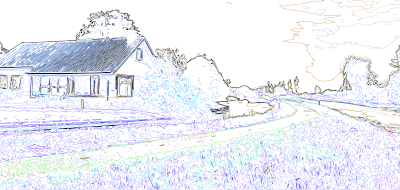


Unfortunately, in doing so, it also loses its colour information. Ideally I need the guidelines and the simplified colours/shapes from the previous layer, so I applied a Soft Light blend mode to remove the white from this layer and overlay it onto the one below.


The result is this fairly ugly but very useful image. It contains both the outlines from find edges and the simplified colours and shapes from the cutout filter, providing a perfect guide to paint over.


Because of the clear colour and edge distinction, I was able to simply use the magnetic lasso tool to make a loose selection around any area in the image. Photoshop was able to very accurately detect the edges of whatever I was selecting and mostly guided itself.
I could then just fill the selection with my chosen colour.

Photoshop introduction

At the end of our Photoshop introduction today, we were set a quick task to raid Google images and create a collage of what we're doing this weekend to ensure we'd taken everything on board and were comfortable using the selection tools we'd been shown. I present the fruits of my labour...


On Saturday I'm going to Guildford for shopping and excitement! On Sunday, I'll be saving the world and probably phoning my mum. When I'm around, party time is all the time.

See below for notes from today if you're interested in that kind of thing!

Aggressive ball — 4th attempt.

Variation on the previous attempt, using roughly the same timing and spacing but with a freehand ball. I also applied a little more squash and stretch to the ball as I did quite like the 'gummy' feel of earlier attempts.


Once again, I also did a slower version, but I think it loses a lot of its personality:

Aggressive ball — 3rd attempt

 
Further experimentation with the 'aggressive' ball idea. This time I reverted back to using Photoshop's marquee tool to create the shapes so that I could focus purely on the speed and spacing.

Initially, I thought it was too fast so I lowered the frame rate very slightly to slow it down a little:

I think the slower one is much smoother, but I think the faster version has the kind of aggression I was going for.

Aggressive ball — 2nd attempt

Still not too much different but it actually looks like it's jumping now. Speed remains much the same, though I think that maybe reducing how much the ball squashes when it lands might help to solidify the impact. Angry things aren't floppy!

Aggressive ball — 1st attempt

Despite all promise of beer and cake, I wasn't allowed to stay in the animation studios all night, so I decided to do a bit of digital experimentation in preparation for getting something finalised finished tomorrow.

I wanted to try expressing mood through motion (that sounds very pretentious, I'm sorry) and am attempting to get a ball that bounces in an angry, aggressive manner.


I was aiming for something that kind of draws itself back in preparation before throwing itself downwards with all its weight, but it hasn't really turned out that way. It kind of just looks like it's stuck to the ceiling, falls off and floats back up again. I'm not entirely sure how to go about fixing it — if I remove too many frames I fear it may be too choppy. It's currently running at the highest frame rate possible (for Photoshop anyway), so whether it would be different in Dragon, I don't know.

I'm going to have another shot at it and see if I can speed up the drop at all.

More balls

After recuperating from my headache I had a little play around in Photoshop to try and get the hang of arcs and things:


It's fairly basic, but I think it came out a bit nicer than my previous attempt! I probably should have squashed the ball at the very end just a tiny bit as it finishes bouncing. I think it's a bit too fast as well?

It's kind of the same basic process as animating on paper, but using Photoshop did allow me to cut a lot of corners and save a considerable amount of time. Generally, I tend to avoid taking too many shortcuts and re-using objects as it can often make things feel a bit stiff, but here the arcs were my main focus.